


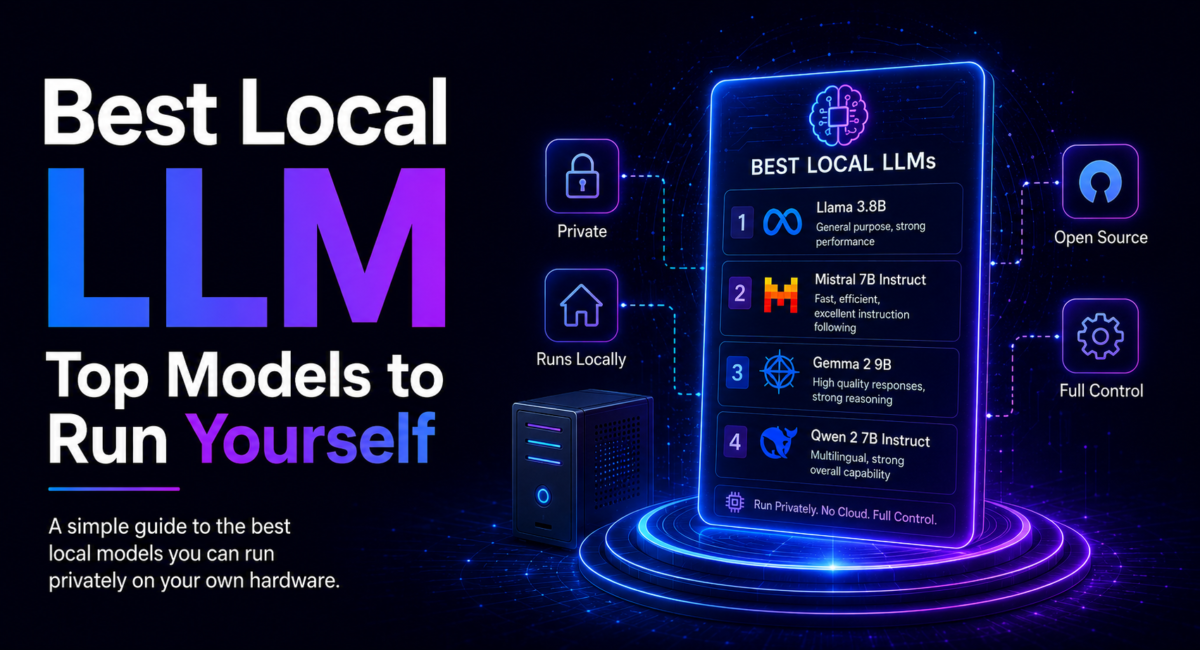
The best local LLM for your needs — Llama, Qwen, Mistral, Gemma, DeepSeek and Phi compared by use case and hardware tier, from 8 GB laptops to 24 GB GPUs.
| 100+ Models on Ollama | Q4_K_M Default Quant | 80-90% of Cloud Quality (14B) | 8 GB Entry-Tier VRAM | 6 Model Families |
| Quick answer: The best local LLM depends on your use case and hardware. For general use, the Llama family offers the best balance and ecosystem; for coding, Qwen (especially Qwen Coder) leads; for math and reasoning, DeepSeek and Microsoft’s Phi punch above their size; and for laptops and edge devices, Gemma and Phi-mini run on minimal memory. On 8 GB of VRAM, run a 7–8B model at Q4_K_M; with 16–24 GB you can run 14–27B models. The leaderboard shifts monthly, so check the live model library. |
Key Takeaways
- Choose a local LLM by use case and hardware, not headline rankings — Llama for general, Qwen for coding, DeepSeek for reasoning, Gemma for lightweight.
- On 8 GB VRAM run a 7–8B model; 16 GB handles 12–14B; 24 GB+ runs 27–70B models.
- The best 14B local models reach roughly 80–90% of top cloud quality, and most people can’t tell the difference on everyday tasks.
- The local model landscape changes monthly, so verify current versions, benchmarks and licenses on the Ollama library and Hugging Face.
Table of Contents
1. What Makes a Good Local LLM?
The best local LLM isn’t a single model — it’s the one that fits your use case and your hardware. A handful of open-model families dominate local use: Llama (Meta), Qwen (Alibaba), Mistral, Gemma (Google), DeepSeek, and Phi (Microsoft), with OpenAI’s open-weight GPT-OSS now joining them. Each leads in different areas — general capability, coding, reasoning or efficiency — and each ships in multiple sizes so you can match the model to your available memory.
The good news is that quality is now genuinely high: there are over 100 quantized models available through Ollama alone, and the best of them rival cloud services on many tasks. This guide ranks them by use case and hardware. It’s the model companion to our guide on how to run an LLM locally, part of our pillar on the best AI models.
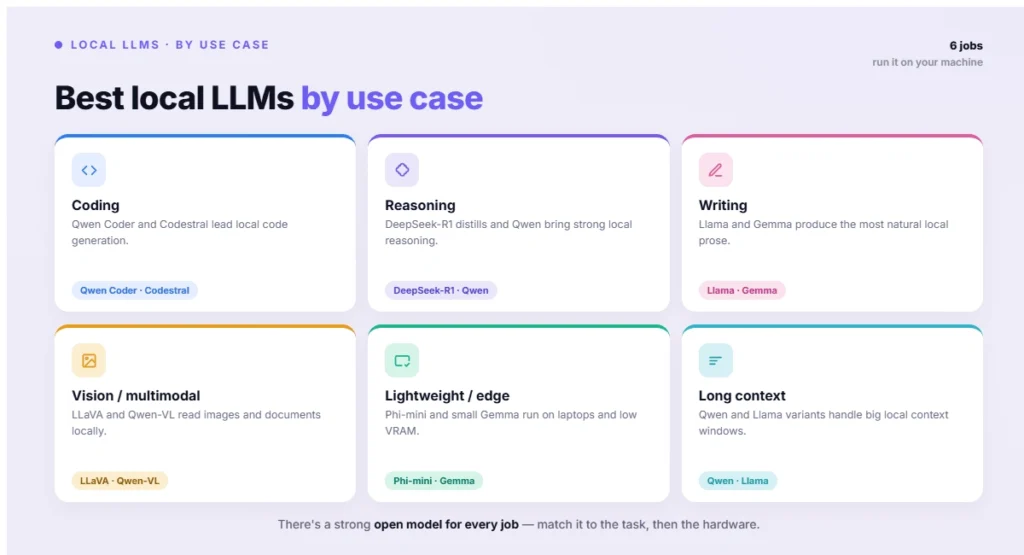
Figure 2: Best local LLMs by use case
2. The Best Local LLMs by Use Case
The strongest models, grouped by what they do best:
Best overall — Llama. Meta’s Llama family strikes a balance across general knowledge, coding and reasoning that few others match, backed by the largest community ecosystem and countless fine-tunes on Hugging Face. An 8B Llama at Q4_K_M scores within striking distance of models twice its size, making it the safe default for general assistant work.
Best for coding — Qwen. Alibaba’s Qwen family, and especially the Qwen Coder variants, leads open-weight coding. Even at 7B it outperforms comparable general models on code generation, and the larger Coder models rival cloud assistants on benchmarks like HumanEval and SWE-bench. It’s also strong at multilingual work.
Best for reasoning & math — DeepSeek and Phi. DeepSeek’s reasoning models deliver gold-medal math-olympiad performance and rival frontier cloud models on reasoning, with accessible distilled variants (from 1.5B up to 70B) for consumer hardware. Microsoft’s Phi reasoning models are remarkably efficient, with a 14B Phi outperforming much larger rivals on reasoning while fitting on 8–16 GB. See mistral.ai for another strong reasoning option.
Best lightweight — Gemma, Phi-mini and Mistral 7B. For laptops and edge devices, Google’s small Gemma models run on as little as a few GB of VRAM (some with multimodal support), Phi-mini (around 3.8B) is the go-to for 8 GB machines, and Mistral 7B is the fastest option for tight hardware, using only 6–7 GB of RAM.
Best efficient production — Mistral Small. Mistral’s Small model (around 24B) is among the most efficient production-ready options, optimized for low latency on a single high-end GPU, often with vision support and a permissive Apache 2.0 license — ideal when you need quality and speed together.
Best offline ChatGPT-like — GPT-OSS. OpenAI’s open-weight GPT-OSS release brings a familiar ChatGPT-style experience fully offline, with variants reported to approach the quality of OpenAI’s smaller hosted models. It’s a natural pick if you want something close to the cloud assistant you already know, running entirely on your own hardware with no data leaving your machine.
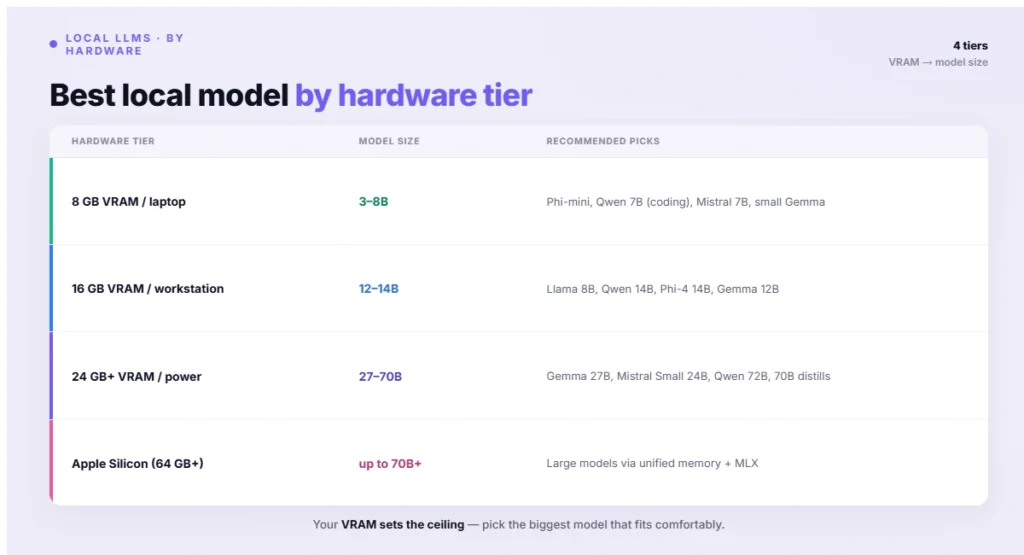
Figure 3: Best local model by hardware tier
3. Best Local LLM by Hardware Tier
Your VRAM (or unified memory) largely decides what you can run.
| Hardware tier | Model size | Recommended picks |
|---|---|---|
| 8 GB VRAM / laptop | 3–8B | Phi-mini, Qwen 7B (coding), Mistral 7B, small Gemma |
| 16 GB VRAM / workstation | 12–14B | Llama 8B, Qwen 14B, Phi-4 14B, Gemma 12B |
| 24 GB+ VRAM / power | 27–70B | Gemma 27B, Mistral Small 24B, Qwen 72B, 70B distills |
| Apple Silicon (64 GB+) | up to 70B+ | Large models via unified memory + MLX |
At the entry tier, a 7B model at Q4 fits in 4–6 GB and runs fast. At 16 GB, Q5_K_M retains slightly more reasoning fidelity. At 24 GB and above, 70B-class models become viable at roughly 10–25 tokens per second. For the full hardware breakdown, see how to run an LLM locally, and to understand the underlying tech, what an LLM is.
4. How Much Quality Do You Give Up?
Less than you might expect. The best local 14B models — Qwen 14B, Phi-4 and Gemma 12B among them — reach roughly 80–90% of top cloud-model quality, and on everyday tasks like code completion, summarization, drafting emails and Q&A, most users can’t tell the difference in a blind test. Open models now match or beat GPT-4-class performance on coding, math and long-context tasks specifically.
Where the gap shows is in the hardest work: complex multi-step reasoning and the most demanding creative writing, where the largest frontier cloud models still lead because they’re far bigger than anything that fits on consumer hardware. The practical takeaway is to use a well-chosen local model for the bulk of your work and reserve cloud models for the occasional task that genuinely needs frontier-level reasoning. In practice many developers find that once a capable local model is set up, they reach for the cloud far less often than they expected, since the local model handles the everyday majority of requests instantly and privately. That hybrid approach pairs nicely with automation, as shown in how to use n8n with AI.
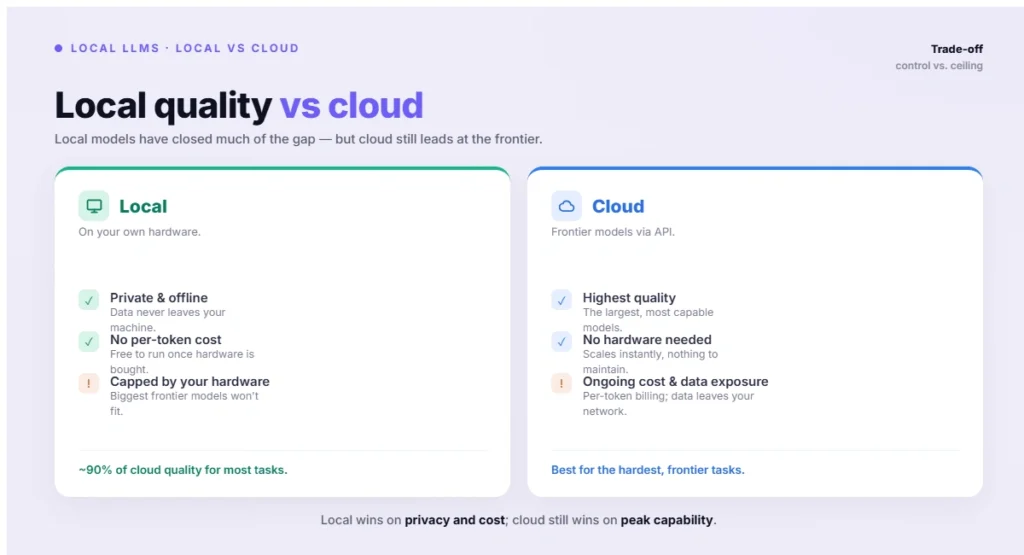
Figure 4: Local quality vs cloud
5. Pricing Table: Best Local LLM 2026
| Model | Best For | Size | Download Cost | Hardware Needed (approx.) |
|---|---|---|---|---|
| Llama 3 (Meta) | Best overall, general assistant work | 8B–70B | Free (open weight) | 8GB+ VRAM (8B); 40GB+ (70B) |
| Qwen (Alibaba) | Best for coding | 7B–72B | Free (open weight) | 6GB+ VRAM (7B); 48GB+ (72B) |
| DeepSeek | Best for reasoning & math | 1.5B–70B | Free (open weight) | 4GB+ VRAM (1.5B); 40GB+ (70B) |
| Phi (Microsoft) | Best reasoning on limited hardware | 3.8B–14B | Free (open weight) | 8–16GB RAM |
| Gemma (Google) | Best lightweight/edge use | 2B–9B | Free (open weight) | 4–8GB VRAM |
| Mistral 7B | Best lightweight, fast on tight hardware | 7B | Free (Apache 2.0) | 6–7GB RAM |
| Mistral Small | Best efficient production model | ~24B | Free (Apache 2.0) | Single high-end GPU (24GB) |
| GPT-OSS (OpenAI) | Best offline ChatGPT-like experience | Varies | Free (open weight) | 16GB+ VRAM |
All local LLMs are free to download and run — the only real “cost” is your hardware (GPU/RAM) and electricity. No subscription or API fees required.
6. How to Choose Your Local LLM
Pick along two axes. First, your primary use case: choose Llama for general assistant work, Qwen for coding and multilingual tasks, DeepSeek or Phi for math and reasoning, Gemma or Phi-mini for lightweight and edge use, and Mistral Small when you want efficient production quality with vision. Matching the model’s strength to your actual workload matters more than chasing the top of a general leaderboard.
Second, your hardware: let your VRAM set the size ceiling, then pick the best model in that class. With 8 GB, run a 7–8B model; with 16 GB, a 12–14B; with 24 GB or more, a 27–70B model. Pull a model with a single command (for example, ollama pull qwen2.5-coder:7b) and test it on your real tasks before committing. Because new models ship constantly, always check the current options on the Ollama library, which lists every available model alongside its pull command. These choices feed directly into broader agentic AI tools and workflows.
| 💡 Pro Tip Don’t fixate on a single “best” model — keep two or three pulled for different jobs. A practical local setup might be a general 8B model (Llama or Qwen) for everyday chat and drafting, a dedicated coding model (Qwen Coder) for development, and a small fast model (Phi-mini or Mistral 7B) for quick tasks where speed beats depth. Switching between them in Ollama is instant, and each is free, so there’s no reason to compromise on one do-everything model. Try a few on your own tasks and keep the ones that genuinely perform — benchmarks are a starting point, but your real workload is the only test that matters. |
7. Best Practices
A few habits get the most from local models. Default to Q4_K_M quantization, which keeps about 95% of quality at roughly a quarter of the memory, and step up to Q5 or Q6 only if you have spare VRAM and need more fidelity. Verify the license before commercial use, since terms vary — Qwen and Mistral use permissive Apache 2.0, while Llama and Gemma have their own community licenses with conditions. Test on your real tasks, because benchmark rankings don’t always predict performance on your specific workload.
Also keep up with new releases: the local LLM leaderboard genuinely changes month to month as new models ship, so a model that’s best today may be surpassed soon — check the Ollama library and Hugging Face periodically. And remember local models can still hallucinate and lack the safety tuning of managed services, so review outputs for important work. Used well, a small library of local models covers most needs at zero ongoing cost, complementing the cloud tools in our best AI models guide.
| ⚠️ Important The local LLM landscape moves fast — specific version numbers, benchmark scores and rankings change monthly, so treat any single ranking as a snapshot and verify current models on the official Ollama library and Hugging Face before downloading. Check each model’s license before commercial use, as open-weight terms differ. Local models can hallucinate and lack the safety alignment of managed cloud services, so review outputs for important tasks. Benchmark scores cited here are directional; test models on your own workload, since real-world performance varies by task. |
8. Frequently Asked Questions
What is the best local LLM?
There’s no single best — it depends on your use case and hardware. For general use, the Llama family offers the best all-round balance and ecosystem; for coding, Qwen (especially Qwen Coder) leads; for math and reasoning, DeepSeek and Microsoft’s Phi excel; and for laptops or edge devices, Gemma and Phi-mini run on minimal memory. Within each family, pick the largest size your VRAM allows. Because new models ship monthly, check the current Ollama library and Hugging Face rankings before deciding.
What is the best local LLM for coding?
Qwen’s Coder models are widely considered the strongest open-weight coding LLMs, scoring high on benchmarks like HumanEval and SWE-bench. Even the 7B Qwen Coder outperforms comparable general models on code generation, making it a great fit for 8 GB machines, while larger Coder variants rival cloud coding assistants if you have the VRAM. DeepSeek’s models are also strong for code, especially on complex logic. For most developers, a Qwen Coder model matched to your hardware is the best starting point for local coding.
What’s the best local LLM for 8 GB of VRAM?
On 8 GB, run a 7–8B model at Q4_K_M, which fits comfortably in 4–6 GB. Strong picks include Phi-mini (around 3.8B) for general use on tight hardware, Qwen 7B Coder for coding, Mistral 7B for maximum speed, and small Gemma models for lightweight or multimodal tasks. These deliver good quality while leaving headroom for context. If you mostly need quick everyday help, a fast 7B model is the sweet spot; for the best quality at this tier, choose the model that matches your primary task.
Can a local LLM match ChatGPT or Claude?
For many tasks, yes. The best local 14B models reach roughly 80–90% of top cloud quality, and on everyday work — drafting, summarization, code completion, Q&A — most users can’t distinguish them in a blind test. Open models now match or beat GPT-4-class performance on coding, math and long-context tasks. The gap remains on the most complex multi-step reasoning and creative writing, where the largest frontier cloud models still lead. A hybrid approach — local for most work, cloud for the hardest tasks — works well.
Which local LLM is best for reasoning and math?
DeepSeek’s reasoning models lead, delivering gold-medal math-olympiad performance and rivaling frontier cloud models on reasoning benchmarks. The full models need substantial VRAM, but distilled variants (from 1.5B up to 70B) make strong reasoning accessible on consumer hardware. Microsoft’s Phi reasoning models are another excellent choice, with a 14B Phi outperforming much larger models on reasoning while fitting on 8–16 GB. For math and logic specifically, a DeepSeek distill or Phi reasoning model offers the best capability per gigabyte of memory.
How big a model can my computer run?
Your VRAM (or unified memory on a Mac) sets the ceiling. As a rule, 8 GB runs 7–8B models, 16 GB runs 12–14B, and 24 GB or more runs 27–70B models, all at Q4 quantization. The baseline is roughly 2 GB of VRAM per 1B parameters at full precision, which quantization reduces by about four times at Q4. Apple Silicon Macs with 64 GB or more of unified memory can run very large models. Always leave 10–20% headroom for the context window’s memory.
Are local LLMs free to use?
Yes — the models and runtimes are free to download and run, so after your hardware investment there are no per-token or subscription costs. Most open models permit free use, though licenses vary: Qwen and Mistral use permissive Apache 2.0, while Llama and Gemma have their own community licenses with some conditions for commercial use. Always check the specific license if you’re deploying commercially. The only ongoing cost is electricity, which makes local models highly economical for heavy or high-volume use.
How do I keep up with the best local models?
The landscape changes monthly as new models and versions ship, so the best approach is to periodically check the Ollama library (which lists available models and pull commands) and Hugging Face (which hosts the models and community benchmarks). Many comparison sites also re-verify rankings each month. Rather than memorizing a fixed list, learn which families lead in which areas — Llama for general, Qwen for coding, DeepSeek for reasoning, Gemma for lightweight — and check for the latest version within your chosen family when you’re ready to download.
9. Conclusion & Key Takeaways
The best local LLM is the one matched to your use case and hardware. Reach for Llama for general work, Qwen for coding, DeepSeek or Phi for reasoning, Gemma or Phi-mini for lightweight use, and Mistral Small for efficient production quality. Let your VRAM set the model size — 7–8B on 8 GB, 12–14B on 16 GB, 27–70B on 24 GB+ — default to Q4_K_M, and verify the license for commercial use. With local 14B models reaching 80–90% of cloud quality, a small library of models covers most needs for free. To go further, see how to run an LLM locally and our pillar on the best AI models.
- Choose by use case and hardware: Llama (general), Qwen (coding), DeepSeek/Phi (reasoning), Gemma (lightweight).
- VRAM sets the size: 7–8B on 8 GB, 12–14B on 16 GB, 27–70B on 24 GB+.
- The best 14B local models reach 80–90% of top cloud quality on everyday tasks.
- Default to Q4_K_M, and verify each model’s license before commercial use.
- The leaderboard changes monthly — check the Ollama library and Hugging Face for current picks.
The best local LLM isn’t a fixed answer — it’s a moving target you aim at your own needs. Match the right family to your task, size it to your hardware, and keep an eye on each month’s new releases, and you’ll have capable, private AI running on your own machine for free.
